Capturing an inquiry is only the beginning. A useful CRM creates structure, automation supports repeatable steps, and people remain responsible for the judgment, trust and conversation that help a real opportunity progress.
CRM & AUTOMATION
The real problem starts after the form is submitted.
Businesses often invest in websites, landing pages and lead generation, then leave the operational journey after Submit unclear. An inquiry may reach only an inbox, have no owner, lack useful context or depend on someone remembering to follow up. Multiple team members may not know its status, and the prospect can receive inconsistent communication.
A lead is not a completed process. It is the beginning of one.
The goal is not to make every interaction automatic. It is to make the first handoff visible and dependable so a good inquiry does not disappear before anyone has a chance to respond well.
CRM & AUTOMATION
What should happen in the first few moments?
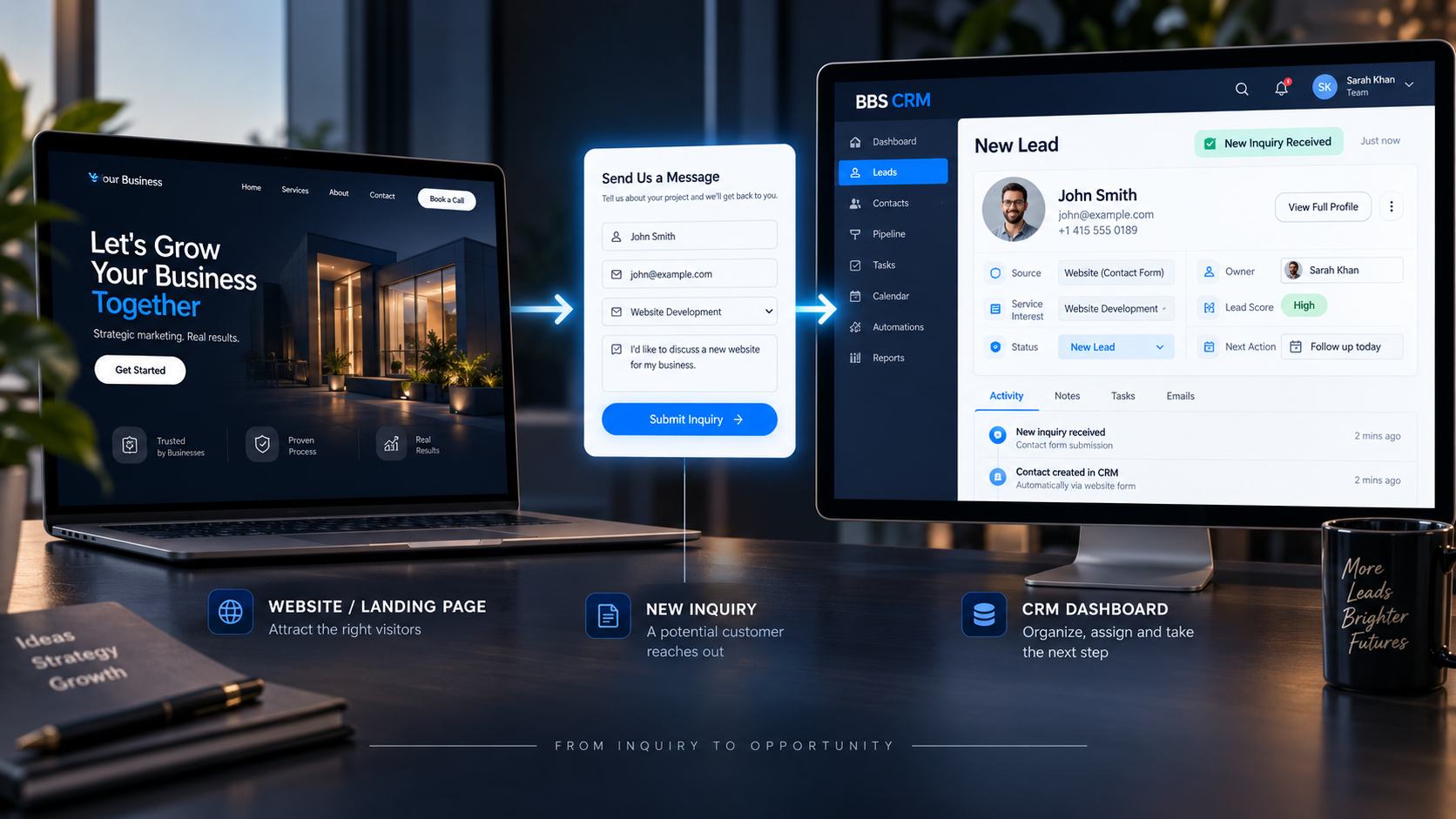
The first sequence should be sensible, not theatrical. Whether an inquiry starts with a form, call, chat or another channel, the business needs a way to create or update the contact, retain source and context, acknowledge receipt where appropriate, notify the right person and create a next action.
Appropriate response timing depends on the inquiry and the business. The important thing is that the system makes responsibility visible rather than relying on chance.
CRM & AUTOMATION
What information should the CRM actually store?
Good CRM data should help someone understand an inquiry without reopening five different tools. Store information that supports the next useful response—not unnecessary personal data.
A clear contact record does not replace conversation. It prepares the person who will have it.
CRM & AUTOMATION
Acknowledgement is not the same as follow-up.
An automated confirmation can reassure a prospect that their inquiry arrived. It is useful, but it is not proof that the inquiry has progressed.
ACKNOWLEDGEMENT
Receipt confirmed“We received your inquiry.”
FOLLOW-UP
Conversation progressed“Here is what happens next.”
The distinction keeps the system honest. A business can acknowledge quickly while still making sure a relevant human response and next action actually happen.
CRM & AUTOMATION
Assignment and ownership keep the inquiry moving.
Every inquiry needs a clear owner. Routing can reflect actual operations: a service request may go to one team, a location request to a local team, a high-intent consultation to an advisor and support to a different workflow. The right rules depend on the business.
The important rule is practical: anyone looking at the CRM should be able to see who is responsible and what is meant to happen next.
CRM & AUTOMATION
Qualification without turning the CRM into a barrier.
Useful qualification may include service needed, timeline, location, business type, project stage, budget range where genuinely relevant, and preferred contact method. It should help the team understand fit without turning the inquiry into an interrogation.
For the website-side principle, read how to turn website visitors into qualified leads. The CRM should preserve useful context after it has been collected—not ask people to repeat themselves.
CRM & AUTOMATION
What should follow-up actually look like?
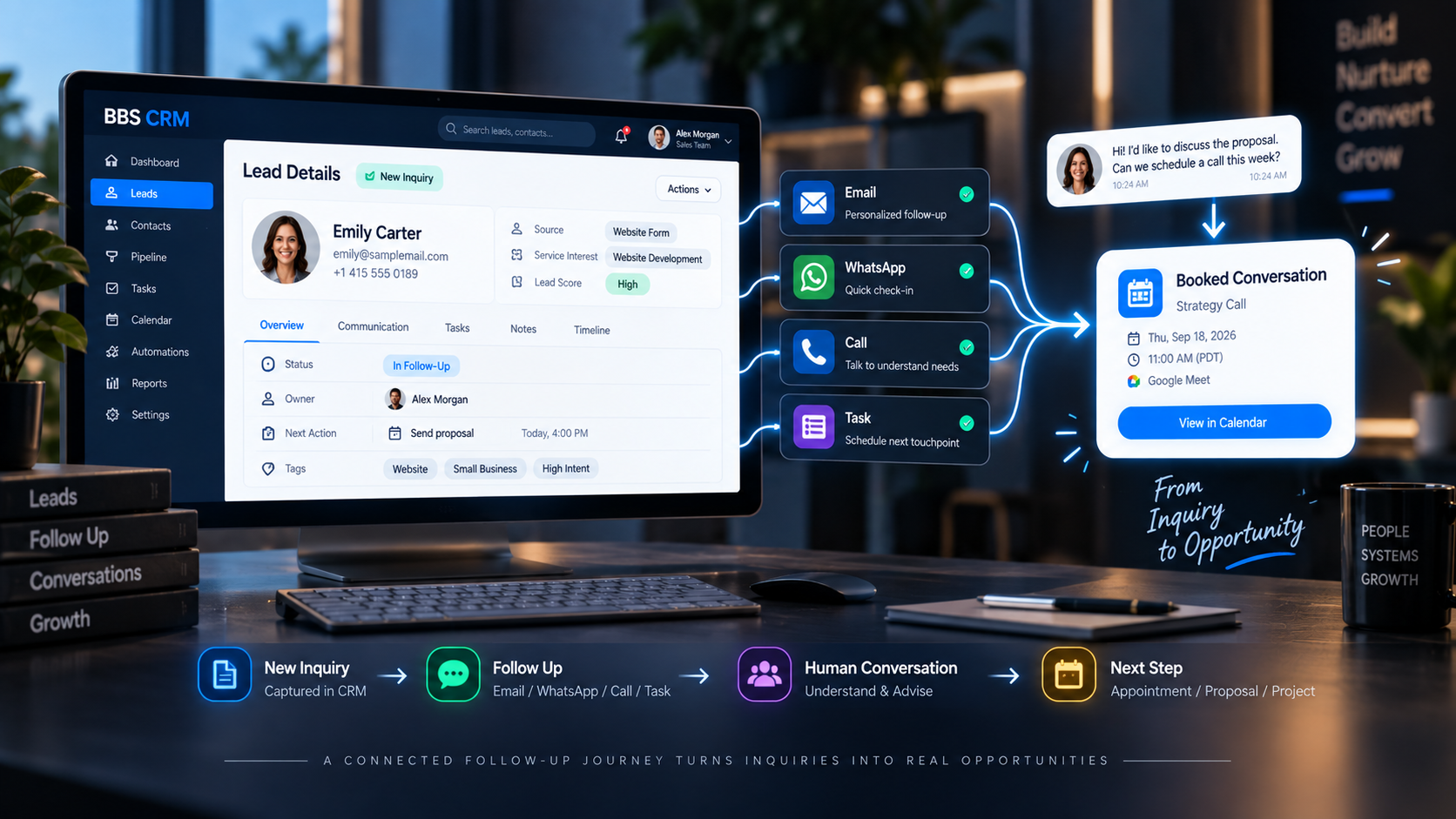
A good sequence is contextual: inquiry received, acknowledgement, human review, first relevant response, an appropriate reminder if needed, conversation and next stage. Email, phone, WhatsApp/SMS where appropriate and consented, calendar booking and internal tasks can each have a place.
Cadence and channel should respect context, consent, urgency, business type and customer expectations. Good follow-up is not aggressive repeated messaging.
CRM & AUTOMATION
The CRM should show where every inquiry stands.
Pipeline visibility helps a team see whether an inquiry is New, Contacted, Qualified, in Conversation, at Proposal/Next Step, Won or Lost/Not Proceeding. These exact stages are examples, not a universal template; they should match real operations.
CRM & AUTOMATION
Automation should handle repetition—not judgment.
AUTOMATE THE REPEATABLE
- Confirmation and internal notification
- Record creation or updates
- Assignment rules and tasks
- Appropriate reminders
- Stage-triggered operational messages
KEEP HUMANS IN THE CONVERSATION
- Unusual inquiries and recommendations
- Consultation and relationship building
- Nuanced objections and negotiation
- Closing and meaningful next decisions
Automation makes reliable operations easier. It should not be used to pretend that judgment, trust or a useful conversation are unnecessary.
CRM & AUTOMATION
What should be measured?
Measure concepts that diagnose the system: inquiry volume and source, response status and timing, qualification status, appointment progression, stage movement, outcomes and follow-up completion. These measures help the business see where the process is working or stalling.
CRM & AUTOMATION
The connected model.
A website or landing page creates the opportunity to enquire. Lead capture brings that context into the CRM. Assignment and follow-up make the next actions visible. Conversation and outcome then provide feedback for future improvement.
Explore how CRM & Marketing Automation can support a connected operational journey.
CRM & AUTOMATION
Practical CRM follow-up checklist.
- Every inquiry enters one visible system
- Source and context are retained
- Prospect receives appropriate acknowledgement
- Someone owns the inquiry
- Next action and status are visible
- Qualification stays useful but restrained
- Follow-up does not rely on memory
- Automation has transition or stop logic
- Human intervention exists where needed
- Outcomes can be reviewed
Frequently asked questions
What should happen after a website inquiry?
The inquiry should enter a visible process: record the contact and context, acknowledge receipt where appropriate, assign an owner and make the next action clear.
Does every small business need a CRM?
Not every business needs complex software, but every business benefits from a reliable way to see inquiries, ownership, context and next actions.
Can a CRM automatically follow up with leads?
It can support repeatable steps such as acknowledgements, reminders and task creation. Human judgment remains important for meaningful conversations and recommendations.
How quickly should a business respond to an inquiry?
The appropriate timing depends on the business, the inquiry and customer expectations. The important point is that responsibility and the next action are visible.
What information should be stored in a CRM?
Store information that helps the team understand and progress the inquiry: contact details, source, message, service interest, owner, status, notes and next action.
How many times should a lead be followed up with?
There is no universal number. Follow-up should respect context, consent, urgency, customer expectations and clear stop conditions.
Can website forms connect directly to a CRM?
Yes. A connected form can create or update a contact and preserve useful context so the right person can follow up from one visible system.